My OSCP Journey, Review, Timelines And Resources
Follow me on twitter and if you loved the blog or it helped you, Support me via BuyMeACoffee

Introduction :
This blog contains my honest review and opinion on OSCP Exam organized by Offensive Security. I am going to discuss about my OSCP journey, it’s lab and exam review, The whole timeline from beginning to end, The resources i used/followed during the preparation and during the labs. And lastly how can you fully prepare for this OSCP exam and what things you should do and should not do during the exam.
Note 🠊 There is a
TOC (Table Of Content)in the right side of the web page use that to go to your desired location on the page
About Me :
My name is Prashant Saini, Currently a college student of 4th year Computer Science Engineering. I am from Haridwar / Roorkee , I am into InfoSec from actually 2.5 years approx. And i recently passed the OSCP Exam on the date 20 August 2021. You can check my Hackthebox Profile And Hackthebox public profile.
Timeline :
This section is about the timeline from buying the exam to getting passed confirmation email.
Booked the course on 1 June
I booked my exam on 1 June for 2 Months of lab access, I didn’t have any international credit card but my friend Soumyadeep Basu helped me here.
Got the course material:
On the 13 of June i got my Course material and practice lab access. And i was very thrilled to start practicing. And i started doing the lab on the 14 June and started reading the Course material.
Completed the lab machines:
On the 8 July i was able to pwn all the 75/75 machines on the, And i had proper notes of every machine i did. And i did take day off on Sunday’s and two Saturdays to just chill
Started making lab report
I had a whole month of lab access and i was thinking what to do now ? Then i thought why not get the 5 extra marks by submitting the lab report. So yes i started making the lab report on 11 July and it was bit boring as well doing things again that i have already done.
Scheduled my exam :
On the 20 July I scheduled my exam on 19 August and yeah i have a whole 1 Month to prepare myself for the exam.
Done with the lab report
Now on the 8 August, i have completed my lab report and included every exercise with proper screenshot and proof.
Gave my exam
Now it’s 19 August and i gave my exam properly starting from 9:30 Am. And i ended the exam at Next morning 8:00 Am
Sent the Exam Report
I made a good report and Attached my lab report with it as per the rules and upload it to the Offsec portal.
Got the Passed confirmation email
On the 22 August i got the email that i have passed the Oscp exam successfully. And i was happy that time.
My Review :
In this Section i wrote about the Review of mine on the OSCP lab, study material provided by Offensive Security And the Exam. Will be writing a full honest detailed review that if i think the money and time you will be giving is worth of it ?
Lab Review :
First i wrote about the labs provided by the OFFSEC for preparation of OSCP,
I started doing the labs on the 15th of June , And completed the labs on 5 of August. There are total 70 active machines that you have to pwn and submit the flag after completing the machine.
Machines complexity :
If you have done Medium / Easy machines from the Hackthebox platform then you are not going to face any difficulty doing the machines, Because the difficulty is like Easy / Medium boxes on Hackthebox. If you have not done hackthebox machines in your life. I would suggest you to started doing, Because it is really going to help you in the lab and exam.The more boxes you will pwn the more you are closer to OSCP. And remember not to pwn a machine after reading / Watching it’s walkthrough. Try it out yourself and if you get stuck only then see only that part of walkthrough. Some machines are easy than the hackthebox easy machines and some are the level of medium boxes on hackthebox
So in the conclusion i will say that the machines difficulty of the labs is not too much hard , I was able to complete 5 to 8 machines in a single day sometimes.
The Machines :
The machines in the labs are pretty nice, they are not that CTFY, Most of the machines are based on Real Life scenarios. I only have one complain about the labs that some of the machines are very old. Offensive-security should update some of the very old machines. This is my request to the OFFSEC, Those old machines doesn’t justify The money you are paying, The course is very expensive but somehow the lab machines are not that premium. You can easily get these type of machines on Tryhackme or Hackthebox.
That’s all i can disclose about the machines, Any information rather than this seems confidential to me due to OFFSEC policy.
The Study Material Review :
The Study material provided my OFFSEC includes videos and a PDF file, The videos contain the practicals mentioned theoretically in the pdf and i am not going to lie the pdf and the videos are very good. The attacks mentioned in the pdf can be seen in the videos practically and the videos shows the attacks very significantly and we can understand everything very clearly.
So in my opinion the Study Material worth the price and the time you are going to pay.
Exam Review:
As you all know that the exam is of total 24 Hours and you have extra 24 Hours to create the report of exam. You have to present your screen and you have to keep your webcam open until your exam end. You will need a high speed internet connection for this at least 2 MB/S is fine, You will not find any issue in this internet speed. The proctor are very responsive to all your queries. Anything you will ask they will reply very fast and they will try to help whenever u face any connectivity issues or vpn issues. The day i was giving exam was a rainy day so my internet was a bit fluctuating and i was disconnecting from proctor panel again and again, Proctor understood my problem and i restarted my router and everything was fine again after that. SO in the exam you are going to get full interactive help from the OFFSEC.
So that was my review on OSCP Exam
The day before Exam :
As scheduled my exam was on 19 august at 9:30 Am, This Section is about the whole exam, how i did and when i did.
A day before exam (Internet Connectivity Issue) :
I used my Smartphone internet as my main source of internet, which is very low almost 1.5 Mb/S, Offensive security has mentioned in the blog that the minimum bandwidth should be 5 MB/S, I have faced connectivity issues in my labs which i don’t want in the exam and the Smartphone internet is very unstable. I had to refresh the network every half an hour. There is no availability of any broadband service in my village so i am unable to get a good internet since my birth
- I live in a village where there is no any
broadbandservice available. - Many relatives of mine lives in Roorkee, And many of them have broadband services installed in their home.
- Roorkee is almost
8 KMfar from my village so its just 15 Mins way from my home to my relatives - I packed up my
Setupand all the other documents , And backed up my kali vm, If anything happens to myPCi can use someone else with virtual box and i can import kali. - I Went to my relative’s (Elder Brother)
homeon 18 August3:00 PMand setup myPCimmediately, To check if my pc is still running or not lol XD. - Now Everything was good and i set up everything including Webcam and internet. I have the
20 Mb/Snow which is more than enough.
The food and sleep :
I took a very light dinner and took almost 8 hours of sleep. So i do not face any problem due to the food taken and i don’t feel sleepy in the exam. And yeah drunk plenty of water to stay hydrated.
The Exam Day :
In this section i wrote about the exam day, Everything i did on that day.
Beginning of the day:
I wake up at 5 Am as usual. I take a bath pretty early and did breakfast and all the refreshing things before 8:00 Am. After turning on my pc did the following things
- Booted up my
kali linuxand created 5 Workspaces for each of the machine - Opened terminal in every workspace
- Used
tmuxin each of the terminal and rename the session with the following sessions- bof-25
- 10-points
- 20-points-1
- 20-points-2
- 25-points
- Created 5
directoriesfor each machine, so i have everything well maintained and not messed up everything.
I used the following Tmux Configuration, It looks very elegant and it gives good vibes while working on your terminal.
Starting the Verification :
I joined the proctor panel at the 9:00 Am and the proctor arrived at the 9:15 i showed him/her following necessary things :
- My working
webcamand presented my screen - Proctor asked me for the
documentverification, I have a FHD webcam but it doesn’t have a autofocus. I asked him if i can use my smartphone Camera ? he said yes and i used https://droidcam.en.softonic.com/ both in my windows and android to share mySmartPhonecamera with windows and after that i simply saidproctorto look at my screen and showed him the documents.- Pan Card
- Voter id Card (Since i am 18+)
- Aadhar Card (He asked me as i am indian)
- College Id card
- Showed him the whole room with the
smartphone
He then sent me the vpn connection, machines i have to pwn and everything else that i needed for the exam
- I showed him the vpn connection after connecting the vpn
- read the instruction very carefully
And then i started pwning the machines
started the Exam :
I started my exam at 9:45 Am the verification took almost half an hour. I have done the machines in the following order
- Buffer Overflow - 25 points
- 20 Points 1st
- 20 Points 2nd
- 25 points
- 10 points
Buffer overflow :
i have started the exam with the buffer overflow machine and i completed this machine in less than 15 minutes. At first time running the exploit i was not getting a shell back but after running some simple things i was able to a shell instantly and completed the buffer overflow very fast than i expected. After completing the this machine i took a break and drunk some water and get back again after 5 minutes.
Machine 20 Points 1:
I was not able to do the 10 points, so while doing the 10 points machine i ran my portscan on the this 20 pointer and after checking back the scan i immediately got the initial foothold of the machine. And i got user in the next 10 minutes. Now the root part took me more than half an hour to Complete it.
While doing it i ran the port scan on the another 20 points machine and while the scan/exploit running for the first 20 points machine i moved to the second 20 points machine.
And i completed the second 20 points machine before the first 20 pointer and getting back to the first 20 pointer i was able to do that as well.
Machine 20 Points 2 :
This machine didn’t take me long, User took me time like half an hour and root took me hardly 20 minutes. I had the 20 pointer 1 user and the full 20 pointer 2 and after completing the 20 pointer 1 i was able to do the root of first one as well. After completing the both 20 pointers i had
1
25 + 20 + 20 + 5 (Lab report) = 70 Points
I was able to get the 65 points in like 4 hours at 2:00 PM, Now i was very confident and that i am going to pass the exam, But i don’t want to stop here since i had a lot of time (19 Hours approx. .
I took almost 3 to 4 breaks in between these hours
Machine 25 points (User only):
While doing the 20 pointer 2 i ran the portscan on this machine, After doing both the 20 pointer, I once trapped into a rabbit hole. But Thinking out of the box get me out and got the user in the 1 hour, After spending a lot of time for the privilege escalation i got into many rabbit holes but i was not able to get the root part. This was the only machine i was not able to get complete. And i lost the hope that i will not able to complete this machine but i think to try it again while making report at the 3:00 AM, i got the vulnerability to get root but i was not able to exploit it somehow, So i left it since i have passing marks 70+ now.
So now it’s almost 3:00 PM and so far i have
1
25 + 20 + 20 + 12.5 + 5 (Lab report) = 82.5 Points
I took almost 2-3 breaks in between doing this machine
Machine 10 Points :
I made this machine very complicated, But this was easy as hell. I was missing a single piece of the puzzle and after getting back to it i was able to complete it within seconds
So after completing the Buffer Overflow machine i strtaed doing the 10 Points machine, i found everything i needed but i was missing something. I left this machine and started doing the 20 pointers and after completing the 25 pointer till user, I tried to do this machine again. And as i told earlier i got that one missing piece of the puzzle. And done this machine within seconds after that. So far i completed my exam at 4:30 PM and now i had
1
25 + 20 + 20 + 12.5 + + 10 + 5 (Lab report) = 92.5 Points
I got the idea of missing puzzle after taking a long rest of half an hour. And Yes i was done now
So i started my exam at 9:45 Am And completed the machines i could at approx. around 4:30 PM. Now its time for report
Report making :
I took a rest after getting this far of approx. 1 hour and get back to the exam again.
Now i did the following things to make my report
- Took
screenshotof every single step - Took screenshot of
local.txtandproof.txt - Edited the report template with the
ipsi was given - Took screenshot of
proof.txt , hostname , ipconfigof every machine - Saved the
buffer overflowcodes for every single step in seperate scripts
And now it’s almost passed 3 hours preparing the report, Now i thought of taking the Dinner at the approx. 9:00 PM and yes i had the dinner. And i was back to the exam at the 10 PM and i made the report for the next one hour and then i told the Proctor that give me the break to sleep, He said yes and i planned to wake up at 3:00 Am
SO generally i took 4 hours of sleep from 11:00 PM to 3:00 AM.
started making a report :
i used the following report template for report writing
Report making took me more time than completing the machines, i wake up at 3:00 AM again and told the proctor that i am back. He told me start my exam again.
Since i have already taken the required screenshots for my report, I started doing the machine again and filled up the missing screenshots and start writing the detailed for every single step, Command screenshot and pasted the command in the report as well.
End the exam :
So after writing everything in detail, and its almost 8:00 Am i told the proctor to end my exam and proctor asked me for confirmation and i said yes. So i started the exam on 9:30 AM and ended the exam at the next 8:00 Am.
And then i slept for the next 2 Hours again and Started examine my report again for submissions
Finishing the report :
I further included the vulnerability fix and the vulnerability Details in the report, And since i have made the lab report as well i have prepare my lab report and looked it again if everything is right.
Uploading the report :
I suggest you to once go through this exam Guide Section 3 once before uploading the report for instruction
So as instructed by the offsec i compressed both my Lab Report and exam report together in the 7zip format and uploaded to the OFFSEC portal in the given format and name etc.
I uploaded the report at 3:00 PM, i had plenty of time left and then i packed up my setup and everything again. And i came back to my village again. I was happy and very satisfied with the exam.
I told my parents about the exam and they were happy as obvious.
Preparation and Practice :
In this section i am going to talk about the preparation and practices i have done and how can you prepare the same.
How did i prepare :
Back in the 2020 when i started out writing blogs i joined the linkedin and twitter, I saw many guys posting OSCP certificate and have oscp in their bio. I researched about oscp on internet and came to know what is it, From that day i am preparing and practicing to get the OSCP.
I have done the following things to prepare for the oscp
Pwned70+ active machines onhacktheboxCompletedTJ Null’s oscp like machines from hackthebox (Retired machines)- Completed 25+ machines from
Proving Grounds by offsec - Completed the tryhackme oscp like
Buffer overflowroom - Pwned all the machines from
OSCPlabs that are75in total. - Made a blog of hackthebox
machinesto keep my writeups welldocumented
Yup , That’s all i did from year 2020 - 2021, You can call it my Preparation for sure.
How can you prepare :
Well i suggest you to do
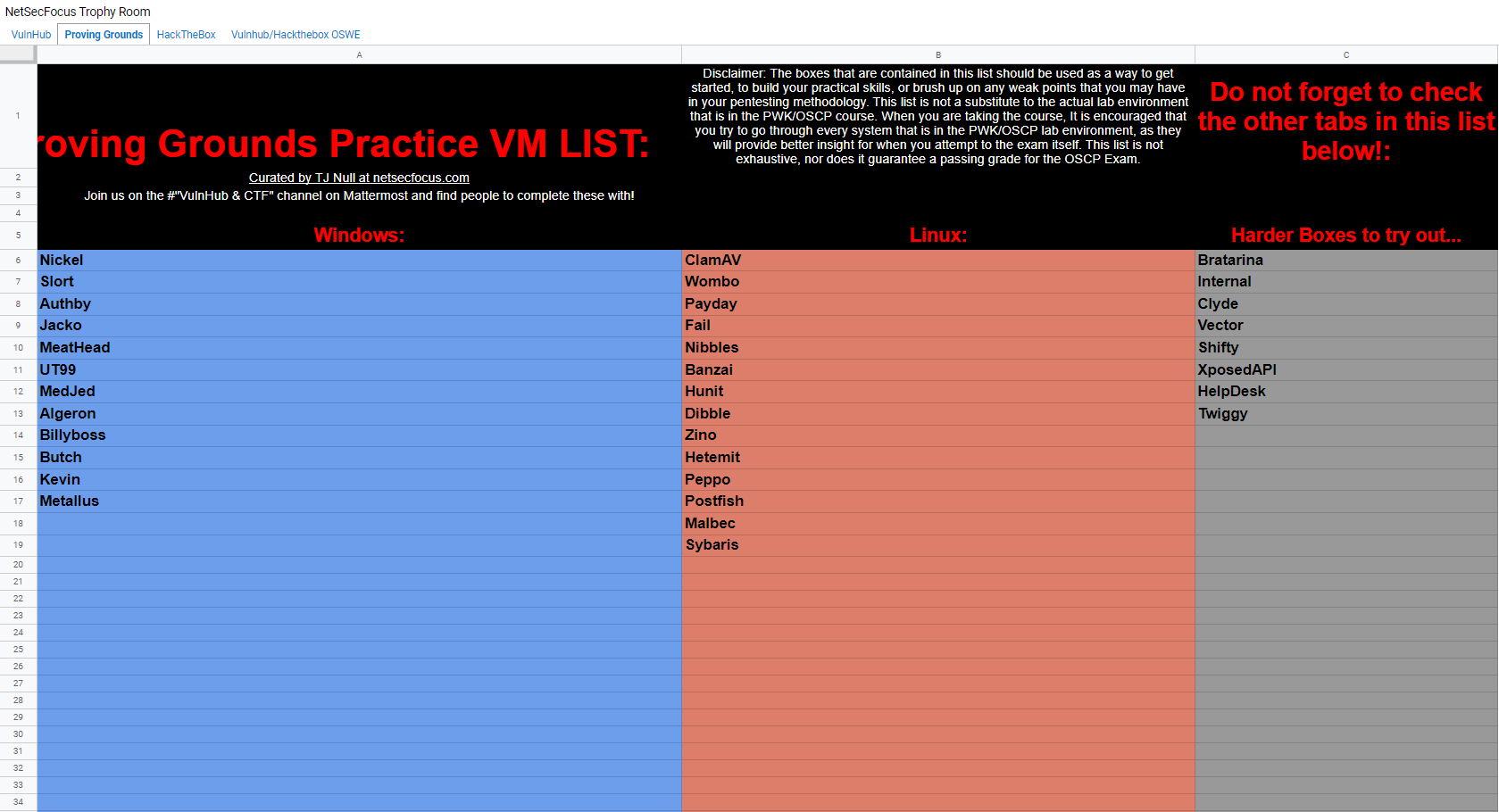
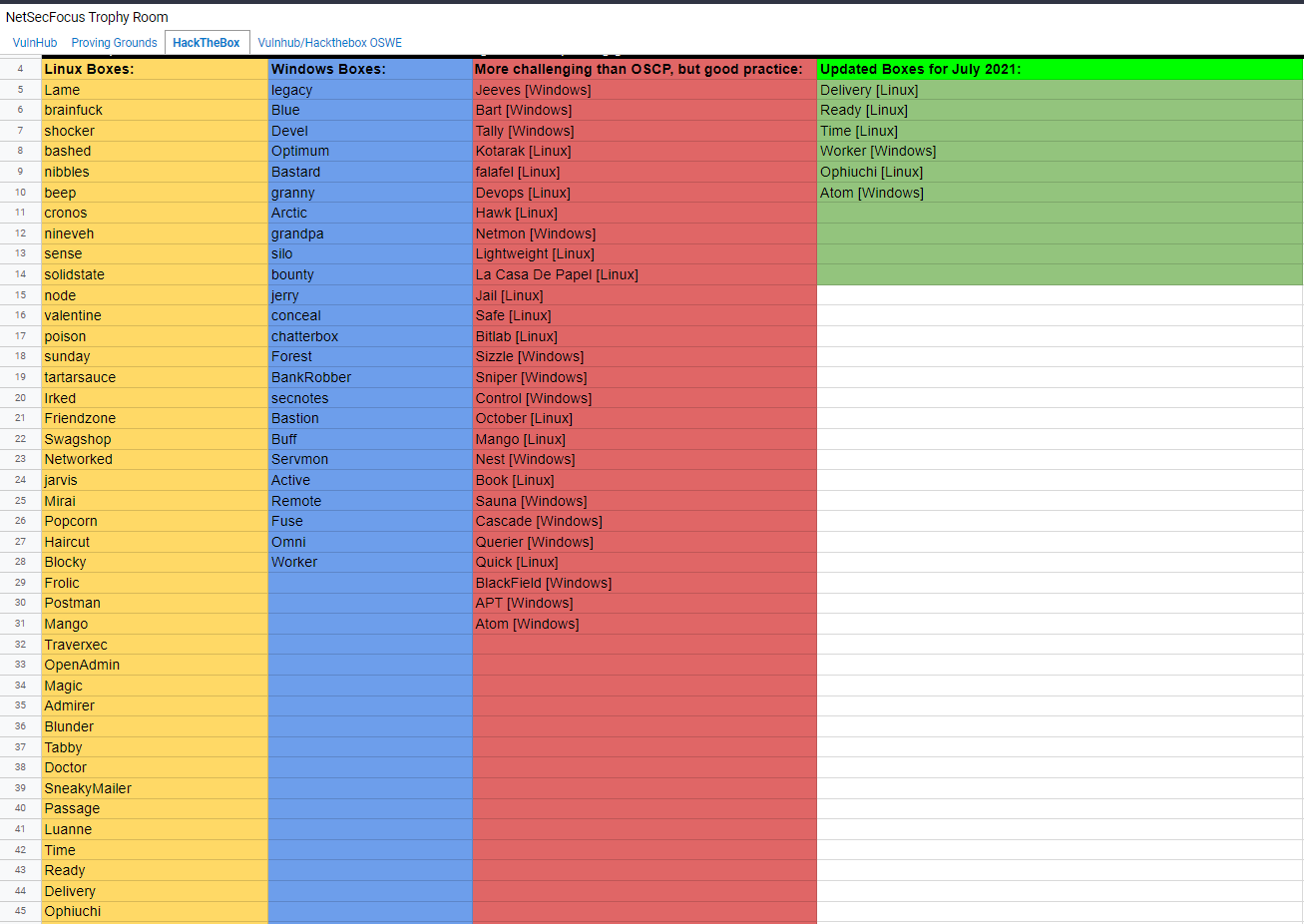 Click once to Zoom in the Picture
- The Oscp-Like boxes mentioned in the
TJ Null'slist on Hackthebox - If you are a
completebeginner and never solved a box before i suggest you to- Start solving the
easyboxes first and then move to medium and hard boxes - If you face any difficulty like how to solve a box and if you got stuck on any
retiredmachine- I will highly
recommendIppsec YouTube Channel - The ultimate 0xdf Blog
- You can follow my blog as well i also have some of the retired machines writeups
- I will highly
- Start solving the
Completethe TryHackme Buffer Overflow Prep room, To Prepare for theStack Based Buffer Overflows. This is more than enough to get the25 Pointsin exam.- Buffer Overflow Prep Room
- A friend of mine Hrithie Menon has documented all the
8 Buffer overflowsfrom this room, This will be very helpful for you
PracticetheProving Groundboxes (Highly recommended)Offensive Securityprovided the Proving Grounds, And the boxes on this platform are pretty much likeOSCP Examboxes. I highly recommend you that you do theTj null'slist for the pg boxes- Complete all the boxes from the list, And practice
howto tackle the Rabbit Holes - Make notes of the machines or you can view
walkthroughafter completing the box, So make sure you capture the screenshot of the walkthrough as notes.
- After buying the
Courseyou will be given a labenvironmentwith 75 boxes.- Make sure to do every
machine - Make motes of every machine you do.
- Make sure to do every
- For making
notesI would recommend two tools / SoftwaresNotion: Notion is a very nice and very well managed notes taking Tool. Its available both online/Offline Means if you want handy notes ,So you can access it from anywhere, You can use their onlineplatformhttps://www.notion.so/ And they have a software as well that is only available formac/windows. So if you want to write down notes offline, Use thatObsidian: Obsidian is the bestofflinetool / Software for note taking. You can install it inMac/Windows/Linuxand download it from https://obsidian.md/.
- Take few mock test to check if you are
preparedfor the exam or not- Few days before the exam take a mock test on the
Proving Groundsselect randomly a 10 Points, two 20 Points and a 25 Points machine and a randomBuffer Overflowfrom the TryHackme Buffer Overflow Prep Room - Make Sure you set the time limit to at least 15 hours.
- Few days before the exam take a mock test on the
Resources are gem :
In this section i am going to talk about the resources i used and resources i suggest you to follow
YouTube Channels :
| Author | Channel / Playlist Link |
|---|---|
| Ippsec | TJ Null oscp like Boxes Playist |
| TheCyberMentor | Buffer OverFlow Made Easy Videos |
| Busra Demir | Oscp Preparation Playlist |
| John Hammond | YouTube Channel |
| XCT | YouTube Channel |
Blogs and Website :
| Author | Link |
|---|---|
| 0xdf blog | https://0xdf.gitlab.io/ |
| HackTricks Book | https://book.hacktricks.xyz/ |
| Rana Khalil Blog | https://ranakhalil101.medium.com/ |
| SnowScan Blog | https://snowscan.io/ |
| 0xRick Blog | https://0xrick.github.io/ |
| Buffer Overflow Practice | Github Repo by Hrithie Menon |
| Reverse Shell Generator (Most Effective Generator) | https://www.revshells.com/ |
Cheet Sheets
| Vulnerability | Cheet sheet link |
|---|---|
| Sql Injection MsSql Cheet Sheet by Perspectiverisk | https://perspectiverisk.com/mssql |
| Sql Injection MySql Cheet Sheet by Perspectiverisk | https://perspectiverisk.com/mysql |
| Sql Injection Oracle Database | https://cheatography.com/ |
| Sql Injection MsSql Full pwnage | https://www.exploit-db.com/papers/12975 |
| Sql Injection Authentication Bypass | https://pentestlab.blog/ |
| File inclusion HackTricks Book | https://book.hacktricks.xyz |
| NoSql Injection HackTricks Book | https://book.hacktricks.xyz/ |
| Nmap Cheet Sheet | Github Repo jasonniebauer |
| Active Directory CheetSheet | Github Repo by S1ckB0y1337 |
| Xss Cheet Sheet | Github Repo PayLoadAllTheThings |
Tools the life saviours :
In this i wrote about which tools i used during the labs and preparation.
Scanning, recon, Exploitation :
| Tool Name | Purpose | Download / Installation Link |
|---|---|---|
| Nmap | Network Scanning | Download/Installation |
| Nmap Static Binary(Lin) | Nmap without installing | Download/Installation |
| Nmap Static Binary(Win) | Nmap without installing | Download/Installation |
| Masscan | Network Scanning | Download/Installation |
| Nikto | Web Application Scanner | Download/Installation |
| Burp Suite (Community Edition) | Web application Pentesting | Download/Installation |
| ffuf | Web Application Fuzzer | Download/Installation |
| Gobuster | Brute-Force subdomain,Vhost,Dirs | Download/Installation |
| Diresearch | Fast Directory Brute-Force | Download/Installation |
| Rlwrap | Command Editing in Reverse shells | Download/Installation |
| Impacket-Tools | Network Protocols tools | Download/Installation |
| Python Static binary | Python Without installing | Download/Installation |
| Reverse Shell Generator | Generate Revershell shell codes | https://www.revshells.com/ |
| FlameShot (highly recommended) | Screenshot Tool | Download/Installation |
Privilege Escalation for windows
| Tool Name | Download Link |
|---|---|
| Winpeas | Download |
| PowerUp | Download |
| PowerView | Download |
| Winodws Exploit Suggester | Download |
| Sherlock | Download |
| Metasploit exploit suggester | Manual |
| Lolbas Widnows Binaries exploitation | LOLBAS |
Privilege Escalation for linux
| Tool / Website | Download Link |
|---|---|
| LinPeas | Download |
| LinEnum | Download |
| Linux Exploit Suggester | Download |
| Linux Privilege Escalation | HackTricks Books |
| Linux Privilege Escalation | g0tmilk’s blog |
| GtfoBins Unix binaries exploitation | gtfobins |
Pivoting and Port Forwarding
| Tool / Website | Download Link | Tutorial / Manual |
|---|---|---|
| Chisel | Link source | Tutorial |
| Plink | Link Source | Manual |
| sshuttle | Link Source | Tutorial |
| Portfwd metasploit | Tutorial | |
| Ssh Portforwarding | Tutorial |
Do’s and Don’ts
In this section i am going to write that what things you do to make your exam / Preparation excellent and things not to do.
Do’s
Have a good setup :
Not gonna Lie , having a good setup saves up a lot of time and increase your productivity as well. In the august 2020 i bought a PC for myself before that time i had a Low configuration laptop in which i could not even run the any Virtual Machine. And i face a lot of issues while working on it. It takes almost 5 mins to boot up. So i upgraded to a PC with the following configuration.
1
2
3
4
5
6
Ryzen 5 2600
8 Gb Ram
256 Gb ssd
22 inches ips monitor
1 Tb Hard Disk
RX 570 Gpu 4 Gb
It’s More than enough for me. Here is how it looks like
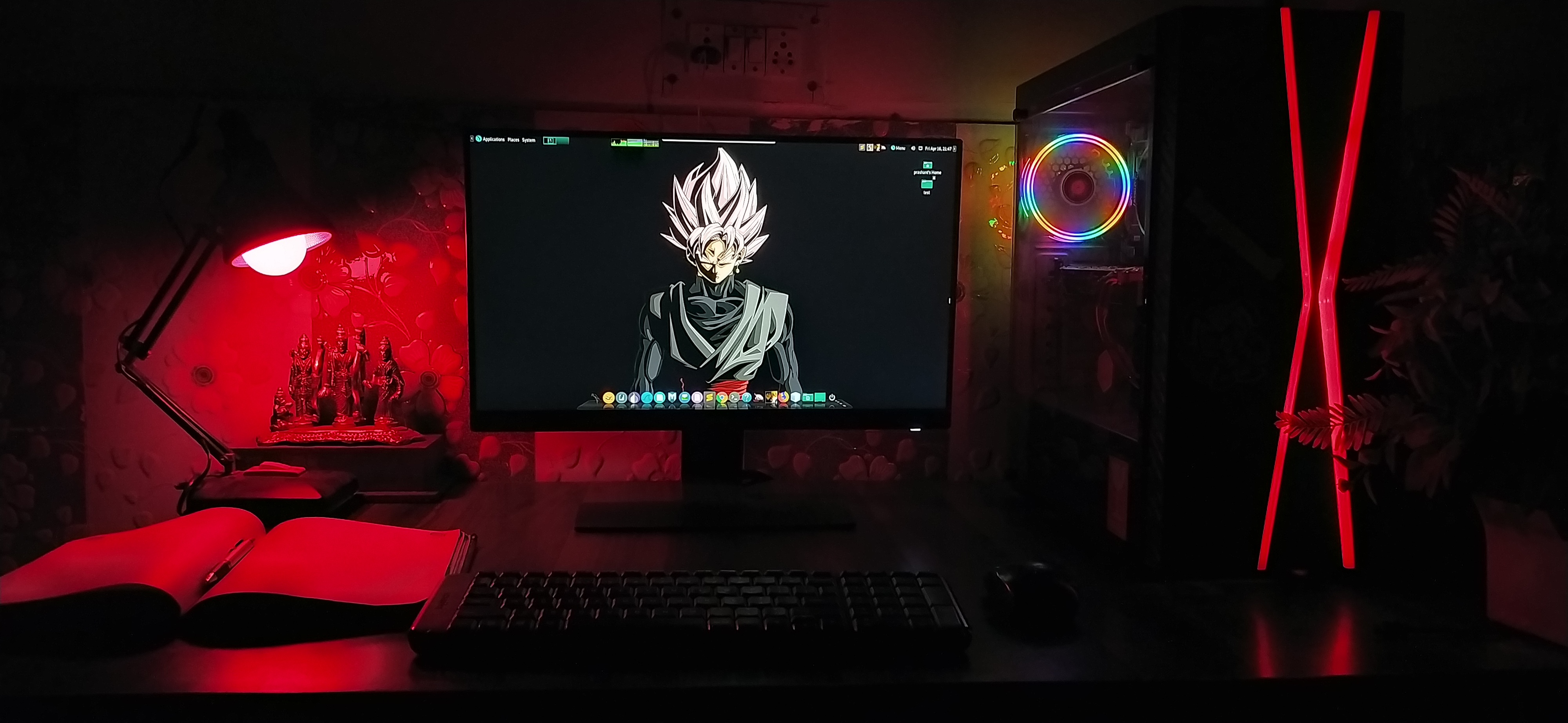
I can run 2 virtual machines and a main windows os at a time abd its more than enough for me.
Having a Good internet Connection :
Although i didn’t have a stable internet connection while doing the oscp labs and practice on other platforms because i use my Smartphone's ISP as a main source of internet, But i would highly recommend you buying a external Broadband or something else that would give you at least 5 MegaByte/Second of internet speed and a very stable connection.
I was only having 2 Mb/s of speed without any stability in my internet. Here is my internet speed.
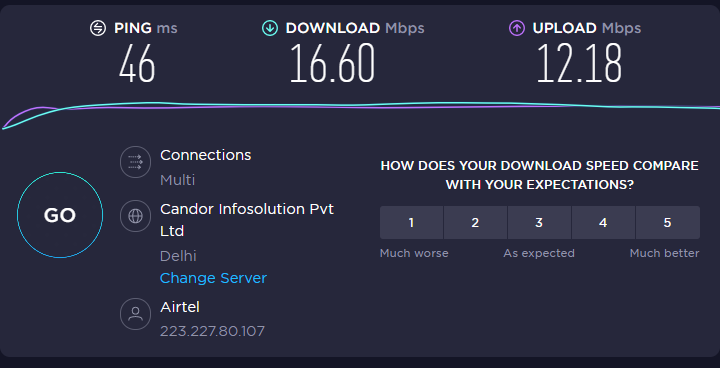
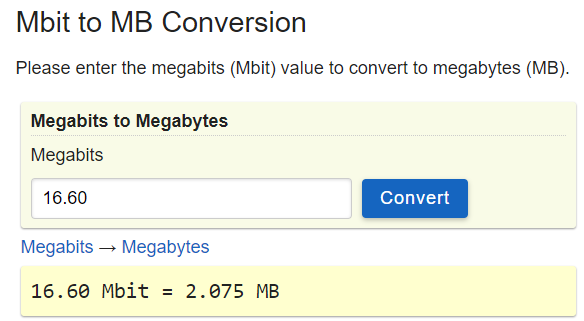
Now if you convert the MegaBits to MegaBytes it’s 2.075
Do’s During the labs
- Take note of every
machineyou do. - Try to spawn every single machine
- Try to complete the
labbefore the time limit. - If you want the extra 5 marks make a lab report then
- Do lab machine first then make the lab
report, Don’t waste the time doing the labreportbut if have enough time aftercompletingthe labs make a report then (Like Me). - I will suggest you to use
Kali Linuxas it has almost all the tools installed you need during the labs.
Do’s During the Exam
- While doing exam if you got stuck somewhere or you feels
exhausted, Take abreakit helps. - Tell the
proctorbefore taking a break, And tell him/her that you are back when you are. - Keep yourself
hydratedas much you can. - Eat light and healthy food before the exam day and on the
examday. - Take Screenshot of every single step so you can make a
detailedreport - Make sure you have a
autofocuswebcam if you don’t have ask proctor if you can usesmartphonecamera to verify documents. - Take a proper before the exam night of approx.
8-10hours. - Take some rest of almost 2-4 hours in between the exam.
Verifyyour report many times if you can.
Don’ts
- Don’t use
smartphoneor any electronic device in between the exam, otherwise your exam will becancelled. - Don’t think that
youhave whole 24 hours to do the exam, Be responsible and spend approx. 4 hours to make a better report. - Don’t panic if something went wrong, Take a chill pill. Think
positive Don'tdo any kind of Practice on the last 2 days of exam. Take proper rest.Don'teat any kind of unhealthy food.
If you liked the Blog or it helped you somehow, please considering support me to write this type of blogs. It was not easy for me to write this blog. It took me some days.
And i am on twitter as well.
Comments powered by Disqus.